

How to Get Stripe Payment Notifications on Your Phone (Without Writing Code)
Hookfire - Stripe.png
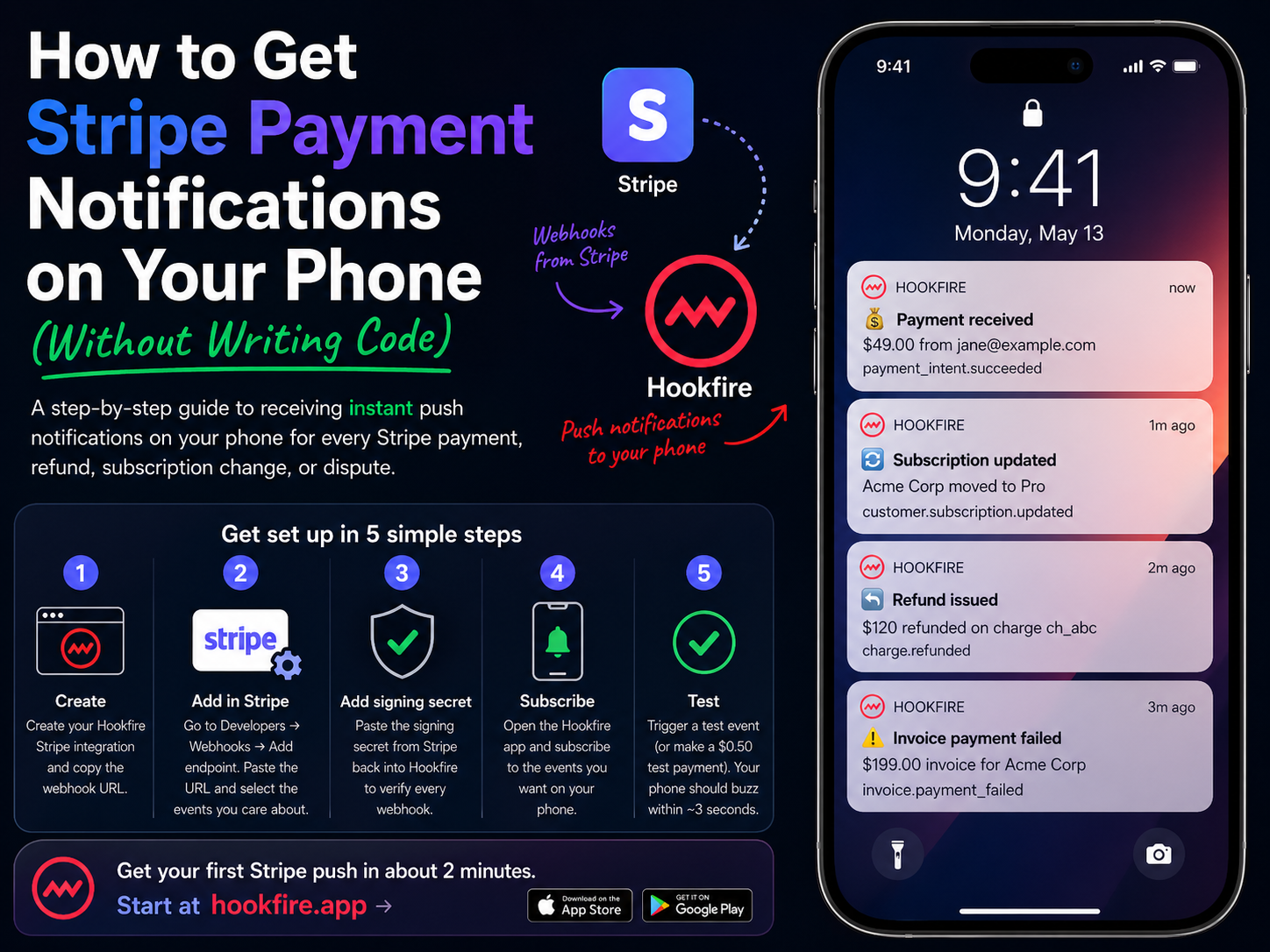
A step-by-step guide to receiving instant push notifications on your phone for every Stripe payment, refund, subscription change, or dispute, without building a backend.
How to Get Stripe Payment Notifications on Your Phone
You made a sale. Wouldn’t it be nice to know the moment it happens, not when you next open the Stripe dashboard?
Stripe already emits webhooks for every meaningful event: payment_intent.succeeded, invoice.paid, customer.subscription.updated, charge.refunded, and dozens more. The problem is turning those webhooks into something that pings your phone.
Here’s the shortest path.
But wait, doesn’t Stripe have its own app?
Yes. The official Stripe Dashboard app sends push notifications for payments, disputes, and a few account events. If those defaults are all you need, install it and you’re set.
Where it stops being enough:
- Limited event coverage. Stripe picks which events earn a push. Subscription lifecycle changes, failed invoices, trial conversions, and Connect events mostly won’t ring your phone.
-
No per-event subscriptions. You can toggle broad categories, not specific event types like
customer.subscription.deletedorinvoice.payment_failed. - Stripe-only. If GitHub, Shopify, or your billing system also matter, you’re juggling multiple apps. Hookfire consolidates them in one feed.
- No customization. The Stripe app shows the copy Stripe writes. Hookfire renders the exact fields you care about, formatted how you want.
- One person, one app. The Stripe app pings the individual logged-in account. With Hookfire, one integration fans out to your whole team: founders, sales, support, ops. People who don’t (and shouldn’t) have Stripe dashboard access still get the notifications that matter to them.
You can absolutely run both: keep the Stripe app for payment alerts, use Hookfire for every other event you want on your phone, and for the rest of your team.
The hard way: roll your own
Historically, getting Stripe notifications on your phone meant:
- Stand up a small server to receive webhooks.
- Verify Stripe’s signature on every request.
- Integrate a push provider (OneSignal, Firebase, APNs).
- Build a mobile app (or at least a PWA) to register device tokens.
- Parse Stripe event payloads and render notification copy.
- Deploy. Monitor. Maintain. Forever.
It’s a weekend project that turns into a quarter.
The easy way: Hookfire
Hookfire is a drop-in webhook-to-push bridge. Five minutes, no code.
Step 1: Create your Hookfire integration
Sign up, create a new Stripe integration, and copy the webhook URL.
Step 2: Add the webhook in Stripe
In the Stripe dashboard, go to Developers → Webhooks → Add endpoint. Paste your Hookfire URL, select the Stripe events you care about (we recommend payment_intent.succeeded, invoice.paid, and charge.refunded as a starting set), and save.
Step 3: Paste the signing secret
Stripe gives you a signing secret. Paste it back into Hookfire so every webhook is verified before it notifies you.
Step 4: Subscribe on your phone
Open the Hookfire app, sign in, and subscribe to the events you want pinged to your phone.
Step 5: Test
Trigger a test event from Stripe (or make a $0.50 test payment). Your phone should buzz within ~3 seconds.
What the notifications look like
Hookfire renders Stripe events into human-readable notifications:
- “💰 Payment received: $49.00 from jane@example.com”
- “🔁 Subscription updated: Acme Corp moved to Pro”
- “↩️ Refund issued: $120 refunded on charge ch_abc”
Every notification includes the amount, currency, customer email (when available), and the event type, all pulled from the actual Stripe payload.
Which Stripe events are worth subscribing to?
For most SaaS businesses, the high-signal events are:
-
payment_intent.succeeded: a one-time payment just cleared -
invoice.paid: recurring revenue landed -
customer.subscription.created: new subscriber -
customer.subscription.deleted: churn, worth knowing immediately -
charge.refunded: awareness, especially for larger refunds -
invoice.payment_failed: dunning situations worth catching early
Hookfire lets you subscribe per-event, so you only get what matters and leave the noisier events out of your phone.
Why this beats email alerts
Stripe already sends email receipts, but emails get buried. Push notifications are:
- Faster: a few seconds vs. minutes.
- Present: your phone tells you, you don’t have to check.
- Tappable: deep-link straight into Hookfire for the full event detail.
Get your first Stripe push in about 2 minutes. Start at hookfire.app →
 Steve
Steve
Turn your webhooks into phone alerts
Know the instant you make money, ship a deploy, or get a support ticket. Stripe, GitHub, Shopify and 25+ more, all as push notifications.
Releasy Corp, 33024 US Highway 19 North, Palm Harbor, FL. US 34684
© 2026 Releasy Corp. All rights reserved.
Other apps from Releasy

Build a community where users provide feedback, vote, and discuss the product features that truly matter to them. Request features from anywhere with the one line embeddable widget.

Indie friendly lightning fast polling you can embed anywhere or share with one click. Generate polls with AI in seconds, get detailed stats, and configure everything in seconds.

A text RPG of private descents. AI generates a fresh dungeon in real time every playthrough, shaped by your choices and never repeated.